

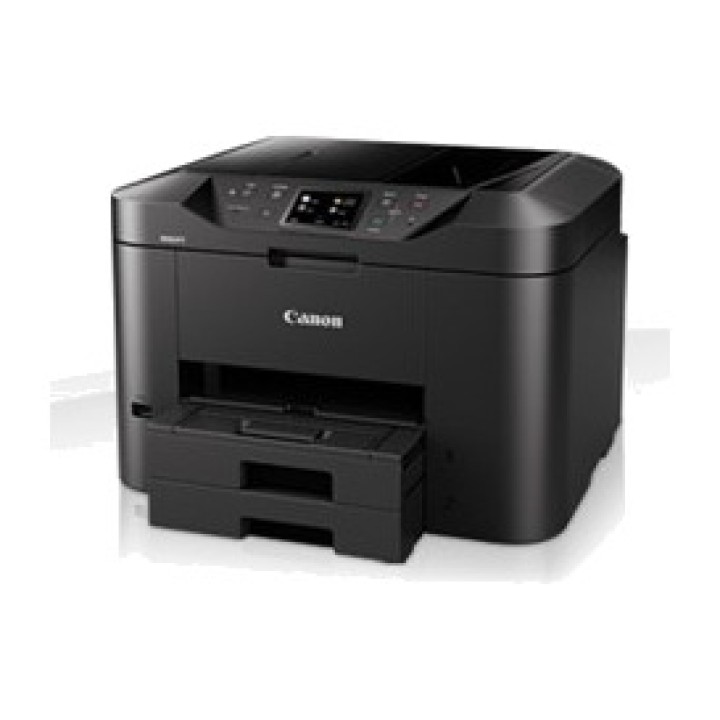
CANON Multifunction inkjet printer with fax and duplex MB2750 24IPM MAXIFYMB2750 images
 Secure payment
Card, bank transfer and financing. SSL on every page.
 Worldwide shipping
Stock available for shipping at competitive rates. Delivery times vary by region.
 Personalized support
Call us at +34 948 088 505 or email us. We answer questions and help with your order.
CANON Multifunction inkjet printer with fax and duplex MB2750 24IPM MAXIFYMB2750

DeliveryUpdating delivery estimate…Order within the next — to receive it approximately Updating delivery estimate…
Updating delivery estimate…
Cuándo es más probable que llegue
Calculado con 0 entregas recientes
Fechas estimadas para España peninsular; se ajustarán con tu código postal y forma de entrega.
The date corresponds to the item with the longest delivery time
IVA intracomunitario
La exención intracomunitaria puede aplicarse a una entrega a otro Estado miembro si el NIF-IVA es válido y el destino cumple los requisitos. La comprobación por sí sola no determina el tratamiento fiscal.
Cómo se comprueba el IVA¿Eres profesional del sector?
Puedes solicitar una cuenta profesional e indicar los datos de tu actividad. La solicitud queda pendiente de revisión; puedes consultar su estado en tu cuenta.
Más información sobre cuentas profesionalesCanarias, Ceuta y Melilla sin IVA español
El tratamiento depende del destino de entrega y de la coherencia de la dirección. Pueden corresponder IGIC, IPSI, aranceles u otros cargos locales.
Más información sobre destinos e impuestosCanon MAXIFY series MB2750
Colour inkjet All-in-One for offices
at home.
Canon’s MAXIFY MB2750 series offers mobile printing and
cloud integration, while its 500-sheet paper capacity
and fast print speed of 24 ipm in black and white maximise
productivity.
/Images/MAXIFY%20MB2750%20Extra_tcm86-1404390.jpg
Overview
True productivity: 24 ipm in black and white, 15,5 ipm in colour
Wi-Fi and LAN connectivity for printing and scanning
Cloud printing and scanning
Ink yields of 1,200 pages in black and white and 900 pages
in colour
Large 500-sheet capacity and 50-sheet ADF
Detailed features
Take a closer look at the Canon MAXIFY series MB2750
For home offices that demand productivity
A fully equipped printer, scanner, copier and fax machine designed
for home offices. With a large 500-sheet paper capacity
and a 50-sheet automatic document feeder, the Canon MAXIFY series
Canon MB2750 delivers excellent prints with deep, dense blacks and
vivid colours and crisp text thanks to its DRHD inks
that resist highlighters and friction. This quality is achieved without
sacrificing speed: it prints A4 at an ultra-fast speed of
24 ipm in black and white and 15,5 ipm in colour, while the first page
out time (FPOT) is just 6 seconds.
Keeps maintenance costs to a minimum
From low power consumption of just 0,2 kWh (TEC) to
individually replaceable colour cartridges, cost efficiency is
a priority.
Black cartridges deliver an ISO yield of 1.200 pages
and colour cartridges 900 pages. The optional 4-colour multipack
contains a complete set of replacement inks to offer
even greater value.
Designed for productivity
Duplex printing and compatibility with a wide range of
paper sizes and types (from A4 plain paper to labels, envelopes,
photo paper and even double-sided ID card copying)
make everyday office printing tasks
easy. Printing, copying, scanning or faxing takes just
a few taps, thanks to its highly responsive 7,5 cm (3?) TFT touchscreen and
improved interface.
Mobile-ready, cloud-ready, ready
to work
Compatibility with Google Cloud Print, Apple AirPrint (iOS), Mopria and the
Canon PRINT app offers fast and
easy printing and scanning from mobile devices. You can print from the cloud and
scan and save documents to cloud services. Compatible services include
Google Drive, Dropbox, Evernote,
OneNote, OneDrive and Concur. The built-in Access Point mode allows
users of smart devices to connect to the
printer without a Wi-Fi network.
Comprehensive monitoring and maintenance capability
IP address filtering enables restricted access options, allowing
permissions to be granted to only a specified number of users, while the
SMTP email compatibility enables secure scan-to-email.
electronic. A range of additional options allow
system administrators to configure the printer and restrict
certain operations, such as scanning to USB, quickly and easily.
Network integration
IT and system administrators will appreciate the compatibility
of the Canon MAXIFY MB2750 series with the Simple Network Management
Protocol (SNMP), which facilitates device management and
integration into existing office networks. SNMP enables a wide
range of monitoring and maintenance functions, including ink levels,
error statuses and page count.
Technical specifications
Find out more about the Canon MAXIFY MB2750 series, its features
and what it can do.
Overview
Overview
Fast, productive All-in-One device for the home office
FUNCTIONS
Print, copy, scan, fax, Wi-Fi, Ethernet + Cloud Link
Print specifications
Print speed (approx.)
24.0 ipm black and white A4
15.5 ipm colour A4
First page out time (approx.)
Black and white: 6 s (ready) / 10 s (sleep)
Colour: 7 s (ready) / 12 s (sleep)
Printing technology
Inkjet, FINE print heads
Maximum print resolution
600 x 1,200 dpi
Print margins (min.)
Top: 3 mm, bottom: 5 mm, left and right: 3.4 mm
Duplex printing
Automatic (plain paper A4, LTR)
SCANNING SPECIFICATIONS
Scanner type
Flatbed, ADF
Scanner technology
CIS colour scanner
Scanner resolution (optical)
Up to 1,200 x 1,200 dpi
Scan speed (ADF) Approx.
Single-sided. 15.5 ipm Colour
Single-sided. 18.5 ipm B/W
Maximum document size
Flatbed scanner: A4, LTR (216 x 297 mm)
ADF: A4, LTR, LGL
Scan depth (input / output)
Color: 48 bits / 24 bits
Grayscale: 16 bits / 8 bits
Scan functions
Scan to email, scan to network folder, scan to the
cloud, scan to USB
COPY SPECIFICATIONS
Copy speed (approx.)
ADF colour: 11.5 ipm
ADF black and white: 22.0 ipm
Multiple copies
Up to 99 pages
Enlargement/reduction range
25–400%, Fit to page
Copy quality settings
Standard, High
Copy functions
Erase frame, collate, 2 on 1, 4 on 1
Fax specifications
Fax type
Super G3 / Colour
Fax resolution
Black and white: up to 300 x 300 dpi
Colour: 200 x 200 dpi
Fax speed
Black and white: approx. 3 seconds (33.6 kbps)
Colour: approx. 1 min. (33.6 kbps)
Fax memory
Up to 250 pages
Coded speed dialling
Max. 100 locations
Group dialling
Max. 99 locations
INKS AND YIELD
Ink type
Dual Resistant High Density Ink
4 ink tanks (black, cyan, magenta, yellow)
XL inks
PGI-1500XL BK (1,200 pages)
PGI-1500XL C (1,020 pages)
PGI-1500XL M (780 pages)
PGI-1500XL Y (935 pages)
Average yield of colour ink tanks (CMY): 900 pages
PAPER COMPATIBILITY
Paper types
Plain paper
Envelopes (DL, COM10, C5, Monarch)
Canon High Resolution Paper (HR-101N)
Canon Matte (MP-101)
Canon Pro Luster (LU-101)
Canon Plus Semi-gloss (SG-101)
Canon Glossy Photo Paper II (PP-201)
Canon Glossy "Everyday Use " (GP-501)
Maximum paper input
Upper cassette: 250 sheets of plain paper
Lower cassette: 250 sheets of plain paper
Paper sizes
Plain paper , A4, A5, B5, LTR, LGL
Photo paper: A4, LTR, 20 x 25 cm, 13 x 18 cm, 10 x 15 cm
Custom sizes: width from 89 to 215.9 mm, length from 127 to
355,6 mm
Paper weight
Plain paper: 64 - 105 g/m
Canon photo paper up to 275 g/m
Connectivity
Wired connections
Hi-Speed USB 2.0
Ethernet 10/100Mbps (auto switching)
USB flash memory port (type A)
Wireless connections
Wi-Fi IEEE802.11 b/g/n
Wireless LAN frequency band: 2.4 GHz
Access point mode
Application compatibility
Canon PRINT Inkjet/SELPHY app
MAXIFY Cloud Link (from the printer screen or smart device
smart) Canon Print Service plug-in (Android)
Mopria
Microsoft Mobile Printing
Apple AirPrint
Google Cloud Print
SOFTWARE
Compatible operating system
Windows 10 / 8.1 / 8 / 7 / 7 SP1 / Vista SP2
Windows Server 2008 / 2008 R2 / 2012 / 2012 R2
Mac OS X v10.8.5 or later
Compatible mobile systems
iOS, Android, Windows RT, Windows 10 Mobile
Minimum system requirements
Windows: Internet Explorer 8, Internet connection or CD-ROM
Mac: Safari 5 and Internet connection
Display: 1,024 x 768 or higher
Included software
Printer driver and fax driver
Quick Utility Toolbox
IJ Network Device Setup Utility
Easy-WebPrint EX
General Features
Display type and size
7.5 cm colour touchscreen
Automatic document feeder
Up to 50 sheets
Dimensions (W x D x H)
463 x 389 x 320 mm
463 x 459 x 320 mm (paper installed)
WEIGHT
12,1 kg
Power supply
AC 100-240 V, 50/60 Hz
Power consumption
Standby (scanner lamp off)
USB connection to PC: approx. 0.9 W
OFF: approx. 0.2 W
Copy (USB connection to PC): approx. 26 W
Typical electricity consumption
0,2 kWh
Noise levels
Approx. 56 dB(A)
Recommended operating environment
Temperature : 15-30 C
Humidity: 10 - 80% RH (non-condensing)
Yield (monthly)
up to 20,000 pages
Recommended print volume
200-1,000 pages/month
Disclaimer
All specifications are subject to change without prior notice.
Print speed may vary depending on the system settings,
system, interface, software, document complexity, mode
of printing, page coverage or type of paper used, among
other things.
Copy speed may vary depending on the complexity of the
document, copy mode, page coverage, type of paper
used, etc. Warm-up time is not taken into account.
The actual fax transmission speed may vary depending on the complexity
of the document, fax settings at the receiving end and
telephone line conditions, etc.
Ink yield may vary depending on the documents printed, the
application software used, print mode and type of
paper used. For more information, visit
All brand and product names are trademarks of
their respective companies.
Footnotes
Print speed (approx.) - The print speed of the
document on plain paper is measured according to the ESAT average in
the office category test of the standard ISO/IEC 24734.
Scanner resolution (optical) - Optical resolution is a measure of
the maximum hardware sampling resolution, based on ISO standard
14473. When scanning at high resolution, the scan size is
limited.
Scan speed (ADF) Approx. - ADF scan speeds
are the average scESAT30secA in the "ADF Productivity Measurement
of ADF" test, ISO/IEC 17991:2015. When scanning or copying a certain
volume of documents (approx. 150 sheets with the default
settings) continuously with the ADF, the printer may
switch to ?standby mode? in which paper feeding
stops for several seconds after each scan to prevent
the ADF from overheating.
Copy speed (approx.) - ADF copy speed is the average of
one-sided ESAT, ISO/IEC 24735, excluding the first set copy time. When
continuously scanning or copying a certain number of pages
with the ADF, the printer may need to pause
(usually less than one minute) after each scan. This
prevents the paper feed mechanism from
overheating. When scanning or copying with the default settings
(color, 300 dpi), page feeding begins to pause
after approx. 80 sheets of paper when loaded continuously or
repeatedly over a short period of time. The pause time may vary
depending on the scan settings, including the colour or black-and-white option
and the scan resolution.
Fax speed - Based on the default setting with the pattern
ITU-T No. 1 for black and white, and Canon's colour fax test sheet for
Canon for colour.
XL inks - Page yield is based on ISO/IEC 24711 and
continuous printing. The printer is supplied with setup ink tanks.
.
Wireless connections - Wi-Fi frequency band: 2.4 GHz
Wi-Fi security: WPA-PSK, WPA2-PSK, WEP, administration password
administration
Energy consumption - Copy: When copying ISO/JIS-SCID N2 (printed with an
inkjet printer) on A4-size plain paper using the
default settings. Specifications are subject to change
without notice.
Typical electricity consumption - * Typical Electricity Consumption (TEC) represents
a product’s normal electricity consumption over one week.
Noise levels - Acoustic noise is measured according to the standard ISO7779.
Yield (monthly) - Yield is defined as the maximum number
of pages printed in a single month at high volume
work.
Volume (m ³): 0.1189
- Brand
- CANON
- Reference
- MAXIFYMB2750
- EAN-13
- 4549292051094
- Weight
- 17 kg
