

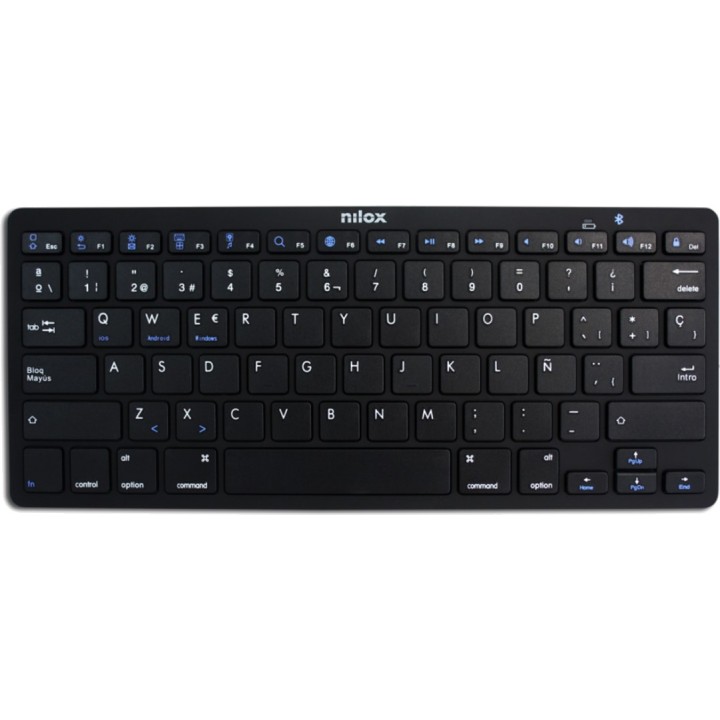
NILOX Spanish Bluetooth wireless keyboard with multimedia keys NXKB01B DSP0000014154 images
 Secure payment
Card, bank transfer and financing. SSL on every page.
 Worldwide shipping
Stock available for shipping at competitive rates. Delivery times vary by region.
 Personalized support
Call us at +34 948 088 505 or email us. We answer questions and help with your order.
NILOX Spanish Bluetooth wireless keyboard with multimedia keys NXKB01B DSP0000014154

DeliveryUpdating delivery estimate…Order within the next — to receive it approximately Updating delivery estimate…
Updating delivery estimate…
Cuándo es más probable que llegue
Calculado con 0 entregas recientes
Fechas estimadas para España peninsular; se ajustarán con tu código postal y forma de entrega.
The date corresponds to the item with the longest delivery time
IVA intracomunitario
La exención intracomunitaria puede aplicarse a una entrega a otro Estado miembro si el NIF-IVA es válido y el destino cumple los requisitos. La comprobación por sí sola no determina el tratamiento fiscal.
Cómo se comprueba el IVA¿Eres profesional del sector?
Puedes solicitar una cuenta profesional e indicar los datos de tu actividad. La solicitud queda pendiente de revisión; puedes consultar su estado en tu cuenta.
Más información sobre cuentas profesionalesCanarias, Ceuta y Melilla sin IVA español
El tratamiento depende del destino de entrega y de la coherencia de la dirección. Pueden corresponder IGIC, IPSI, aranceles u otros cargos locales.
Más información sobre destinos e impuestosits wireless technology lets you work at a maximum range of 10 metres without
interference.
Elegant and minimalist, the NXKB01S also features 14 multimedia keys to
expand its capabilities.
Facility
1.Remove the rear cover of the Bluetooth keyboard and insert 2 AAA batteries (not supplied).
2.Make sure the batteries have been inserted correctly and close the cover removed
previously.
3.Set the rear switch to the ON position. The power / Bluetooth indicator will
will light up for 5 seconds and switch off.
4. Press the connection button; the power / Bluetooth indicator light will start
flashing; the keyboard is now in pairing mode.
5. Turn on Bluetooth on your device and search for devices.
6. If the search is successful, you will find the reference appMX300BTx,
please pair your keyboard with your device.
7. If your device requests a PIN, please enter the one that is
displayed on your Bluetooth keyboard.
8. Switch between Android, Windows and iOS systems
Press the Fn + Q button for Android.
Press the Fn + W button for Windows.
Press the Fn + E button for IOS.
specs
Power control
Feeding
Battery
Keyboard battery type
AAA
Keyboard
Keyboard layout
QWERTY
Pointing device
NOT
Keyboard language
Spanish
Device interface
Bluetooth
Keyboard switch
Scissor-switch key
Numeric keypad
NOT
RECOMMENDED USE
UNIVERSAL
Packaging
Number of products included
1 piece(s)
Mouse
Mouse included
NOT
Design
Product color
BLACK
Backlight
NOT
Volume (m ³): 0.0013
- Brand
- NILOX
- Reference
- DSP0000014154
- Weight
- 0,5 kg
